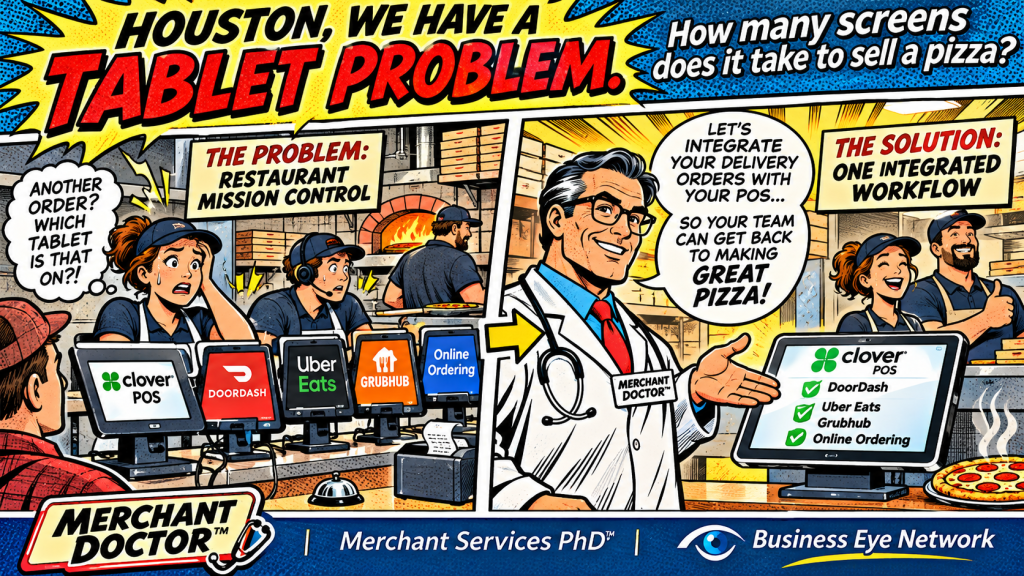
How many tablets does it take to sell a pizza—and how many dashboards does it take to understand the sales?
Walk into a busy independent restaurant and you might mistake the counter for NASA’s Mission Control. One tablet sounds for DoorDash, another for Uber Eats, another for Grubhub, while the restaurant’s point-of-sale system and kitchen screens run alongside them.
These are not necessarily bad services. But managing every channel as a separate workstation can create extra steps, fragmented reporting, device clutter and potentially avoidable recurring expenses.
The opportunity isn’t simply entering orders faster. It’s bringing supported ordering channels into one connected restaurant workflow.
Four tablets, four workflows—and a reporting problem
When delivery platforms operate separately, staff may need to monitor multiple screens, manage different alert sounds, update menus in several places and switch between dashboards to understand order activity. Orders may also require manual entry into the POS or kitchen system.
With a compatible integration, supported marketplace orders can arrive in the restaurant’s POS environment and route through established kitchen workflows, including supported kitchen printers or kitchen display systems (KDS). Exactly which functions are available depends on the delivery marketplace, integration provider, POS plan and configuration.
The reporting benefit is bigger than it looks
Consider an illustrative consolidated POS sales report. Instead of checking separate devices just to compare activity, the owner can see tender categories in one report:
| Tender category | Reported amount |
|---|---|
| Credit and debit cards | $14,986.59 |
| Cash | $1,188.31 |
| DoorDash | $2,416.22 |
| Uber Eats | $1,083.46 |
| Grubhub | $43.57 |
| Total amount collected | $19,718.15 |
Illustrative figures adapted from a reporting example; not a disclosure of a named merchant’s results.
The value is visibility: the owner can compare supported channels alongside in-store activity without treating each tablet as a separate reporting island. The restaurant can still distinguish delivery-platform orders from cash and card tenders.
Important: A consolidated sales report is not proof of consolidated bank deposits, net revenue, or automatic commission reconciliation. Delivery marketplaces may remit funds separately and deduct their own fees. Accounting still needs to reflect those differences accurately.
One order flow, one kitchen
A well-configured integration may reduce the need to watch individual tablets and manually re-key orders. Supported orders can enter the POS, then follow configured routing to a shared kitchen printer or KDS. Staff can focus on preparing food rather than translating orders from one screen to another.
Before promising a completely tablet-free setup, confirm order acceptance behavior, menu and modifier syncing, out-of-stock controls, printer/KDS routing, error handling and whether a fallback device is needed.
What about internet bandwidth?
Every additional tablet is another connected device to provision, update, secure and troubleshoot. Removing unnecessary devices can simplify Wi-Fi management and reduce device traffic. However, order notifications themselves usually use relatively little bandwidth, so eliminating a few tablets is not a guaranteed fix for slow internet or POS authorization failures. Network capacity, wireless coverage, streaming devices and latency should be evaluated separately.
Could consolidation lower monthly costs?
Potentially. Some restaurants incur recurring charges for delivery-related devices or services, depending on their contracts. Those are worth auditing before and after integration. As an example, a verified $15-per-week charge would amount to $780 annually for one service, or $2,340 for three—but those figures are illustrative, not standard marketplace pricing.
Integration can also introduce its own software or setup fees. Marketplace commissions generally remain in place even when orders are integrated into a POS. Commission rates and subscription arrangements vary by provider and contract; no single percentage should be assumed.
The right comparison is total existing cost versus total integrated cost, alongside the value of simpler reporting and fewer operational steps.
Five questions to ask before consolidating
- Which delivery platforms can my current POS and plan actually integrate?
- Will orders route automatically to my existing kitchen printer or KDS?
- Will delivery activity appear in consolidated POS reporting, clearly separated by channel or tender?
- Which tablet rental, software or service charges can actually be canceled—and what integration fees replace them?
- How will marketplace payouts, refunds, commissions and deposits be reconciled in QuickBooks or other accounting software?
Ask for a live demonstration using real menu items, modifiers and test orders. Review a sample report and verify the fees before committing.
The Merchant Doctor™ approach
Sometimes a business doesn’t need a new POS system. It needs someone to examine the devices, subscriptions, reporting and workflows it already has.
At Business Eye Network, we believe merchant services should help owners understand their operations, not just the rate they pay to process a credit card.
Fewer disconnected screens. Cleaner kitchen routing. Better visibility into sales. Potentially fewer unnecessary fees.
Your restaurant should be making pizzas—not managing a command center.
Learn more at BusinessEyeNetwork.com.
Merchant Doctor™ | Merchant Services PhD™ — Diagnose first. Prescribe second.


Leave a Reply